Thriving in Organized Chaos with Tags
- Aisyah Saad
- Aug 17, 2024
- 1 min read

For Mac users who thrive in organised chaos… Do you know that you can organize your disorganized files and folders using tags?
Tagging your files is a nifty way to quickly organise and retrieve your files/folder that you are working on, instead of using Spotlight search. On many occasions, Spotlight search could not find the PDF articles I needed for writing…
How it works?
No need to keep files in folders… A strange as it sounds, you can afford to have files anywhere in your Mac (desktop, download folder, document folder etc) as long as you tag them with a name. And of course, remember the name.
So when you need all the files for writing a manuscript, don’t search for them.
Just go to the tags (bottom, left-hand side of a folder) as shown below. Click on the correct tag and your computer will magically retrieve and list all files under the tag name.
For example in the screengrab below, I tagged my lecture materials with the number ‘631’, the code of the course. With a click, Finder shows me the files tagged with that number. There are four files associated with the tag.
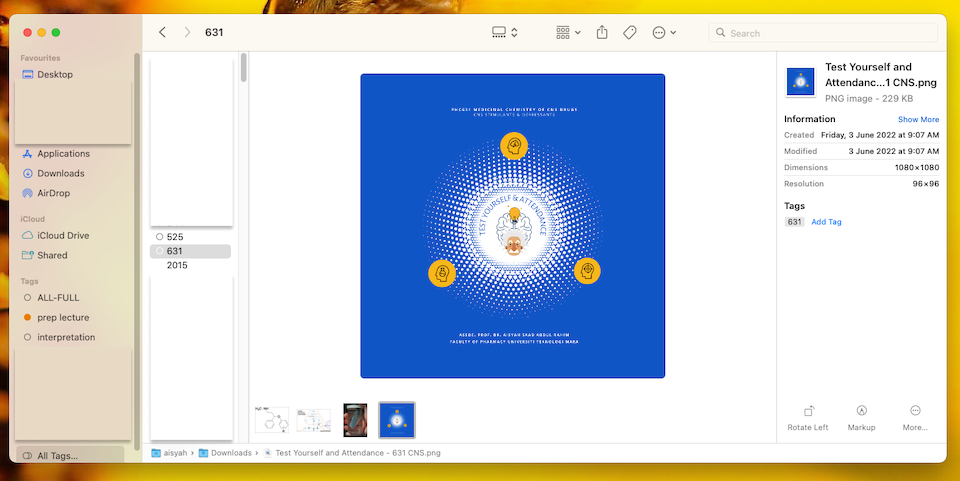
Tags in Apple computers OS
The same goes if you’re using Apple Notes or iA Writer or social media. You can pull notes/files/posts together by tagging it with a hashtag.
An effective way to organise a particular collection of files for a particular purpose.
Hope you’d find the post useful. Till next time.
*This post was originally from the previous one on 25+ apps and platforms to enhance research workflow and productivity.

Comments